PS/2 KVM Server Switch, 2-Port
Control two PCs with one keyboard, monitor and mouse
Also known as: KVM server switches, pc switch, ps/2 switch, keyboard switch, monitor switch, server switch, CPU sharer, kvm switch, PC switches, keyboard video mouse switch.

Additional Images
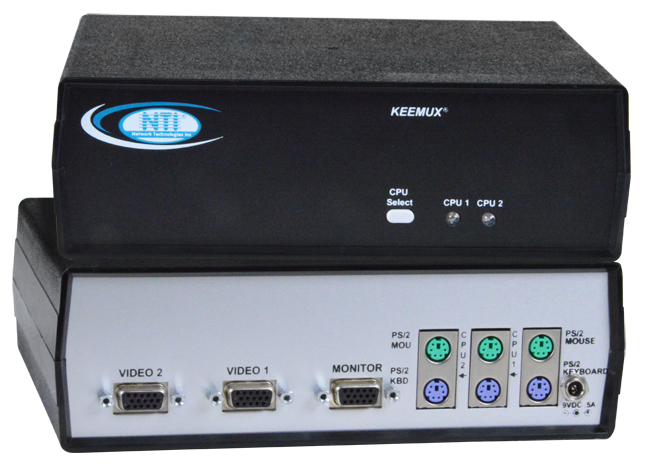

The KEEMUX™ PS/2 KVM switch allows one keyboard, monitor and mouse to control two PCs. Dedicated internal microprocessors emulate keyboard and mouse presence to each attached PC 100% of the time so both computers boot error free.
The KEEMUX™ PS/2 KVM switch allows one keyboard, monitor and mouse to control two PCs. Dedicated internal microprocessors emulate keyboard and mouse presence to each attached PC 100% of the time so both computers boot error free.
- Control all network computers from one office.
- Auto scan all computers to catch system failures early.
- Improve manageability of your computer room – eliminate extra cables, monitors, keyboards and mice.
- Compatible with IntelliMouse®.
- Broadcast keystrokes to all computers for simultaneous shut-downs.
Hosts
- Female 15-pin HD and female 6-pin miniDIN connectors.
- Compatible with all PS/2-style PCs and laptops, HP9000, Silicon Graphics and IBM RS6000 workstations.
- Compatible with SUN Fire V20z.
- Multiplatform support: Windows 7/8/10/11, Windows Server 2008/2012/2016/2019/2022, Linux, and FreeBSD.
Monitor
- Female 15 pin HD connectors.
- Supports 1920x1200 resolution with no degradation.
- Bandwidth is 150 MHz.
Mouse
- Female 6-pin miniDIN connectors.
- Compatible with all standard 2-button PS/2 mice as well as the following:
- Alps Glidepoint Touchpad – extended functions (i.e. tapping, etc.) are not supported.
- Cirque Glidepoint Touchpad.
- IBM Scroll Point mouse – extended stick functions are not supported.
- Kensington Orbit Trackball.
- Logitech (and other) 3-button mice.
- Logitech 2-button Wheel Mouse.
- Microsoft Ballpoint mouse.
- Microsoft IntelliMouse.
Keyboard
- Female 6-pin miniDIN connectors.
- Keyboard and mouse presence are emulated 100% of the time so all computers boot error-free.
- Keyboard and mouse are hot-pluggable.
- PC switch will hard or soft boot all PCs 100% of the time.
- SCROLL-, CAPS- & NUM- LOCK lights update upon switching.
Power
- Powered from attached computers.
Environmental
- Operating temperature: 32 to 100°F (0 to 38°C).
- Storage temperature: -22 to 140°F (-30 to 60°C).
- Operating and Storage Relative Humidity: 5 to 90% non-condensing RH.
Regulatory Approvals
- RoHS
- TAA compliant
Warranty
- 2 years
Front Panel Interface
- Touch a button and be connected to a CPU or change modes of operation.
- LEDs indicate currently selected port and mode of operation.
- Hold in any button for more than two seconds to go into Scan Mode, Broadcast Mode or Command Mode.
- Normal Operating Mode, the user can directly operate the selected computer with transparent presence of the NTI switch.
- Scan Mode feature causes the switch to automatically and sequentially display the video from each powered on computer for 2-255 seconds.
- Broadcast Mode feature allows the user's keystrokes to be sent to all powered on computers.
- Command Mode allows the user to give instructions to the switch through their keyboard. Keystrokes are not passed to the computer.
Keyboard
- Type <CTRL> + <`> to go into Command Mode. (" ` " is the accent mark located on the same key as the tilde " ~ ")
- Press ESCAPE to leave Command Mode and return to Normal Mode
- Scan Mode, Broadcast Mode or Command Modes are available from the keyboard.
Data Sheet:
User Manual:
CAD Drawing:
Application Drawings
-
PS/2 KVM Server Switch
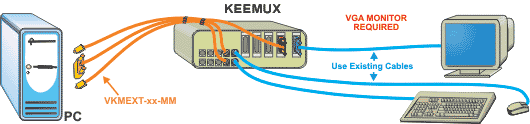 How to control Control multiple PCs with one keyboard, monitor and mouse
Network Technologies Inc |
 |

